Texting Your Name
In 2018, we added the ability for viewers to supply their first name via text message and have it included in the display. The name immediately displays on the small grid under the clock, and then every 10 minutes or so, a 1-minute sequence is displayed where 13 names are included on the 18’ × 8’ grid. Starting in 2019, viewers can see their spot in the queue using the same website used for voting.
How it Works
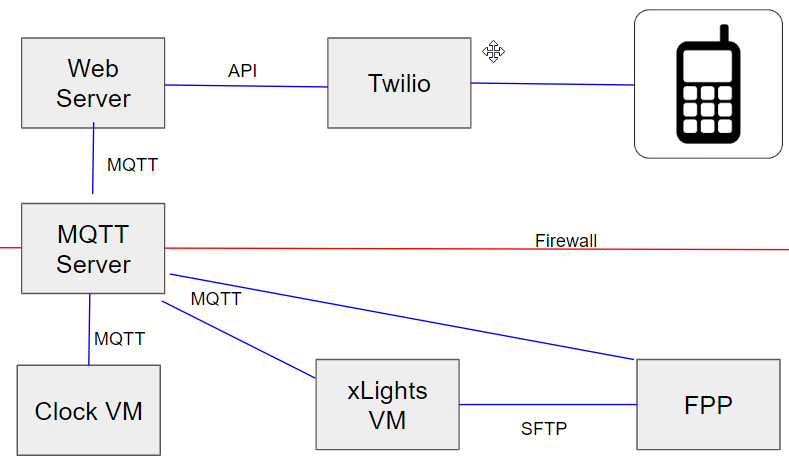
- We use the Twilio service to convert inbound text messages to API calls on our web server.
- Our web server (python fastAPI) accepts the message from Twilio.
- The Python code validates the name against a whitelist of valid first names provided by the Social Security Administration.
- If the name isn’t in the whitelist, a text message is sent to the admin and the sender is notified that the name needs review.
- For valid names, an MQTT message is generated and sent to both the Clock VM and the xLights VM box where it will be added to a local queue.
- The Clock VM runs a custom C++ program that always drains the queue of names before doing any other greetings or graphics.
- The xLights VM is an Ubuntu VM running a Python process. The name is added to the queue, and the current queue is always published every 2 seconds so that the web server knows the current status.
- In FPP, the sequence is set up so that a sequence called “WISH_Names.seq” plays approximately every 10 minutes. (The exact duration is controlled by the webserver and dynamically changes based on the number of names in the queue.) Just before it is time to play the names, the webserver sends an MQTT message asking the xLights VM to generate the sequence and move it to the FPP server.
- The xLights VM takes the next 13 names from the queue and generates a new xLights .xml file by loading a template with %NAME_1%, %NAME_2%, … %NAME_C% placeholders and doing a simple replace. If there aren’t enough names, it selects a few from the database since the sequence is designed to always play 13 names.
- Once the .xml file is generated, the Python process runs
xLights -r WISH_Names.xmlto generate the .seq file. - As soon as the .seq file is generated, the Python process uses the FPP API to upload Wish_names.seq to the FPP server and sends a signal via MQTT to let the webserver know everything is ready.
- The webserver then schedules the names song as the next song to play.
- While all this is happening, both the Voting Website and Stats server monitor all traffic and provide updates to both the admin and end users.
Admin Interfaces
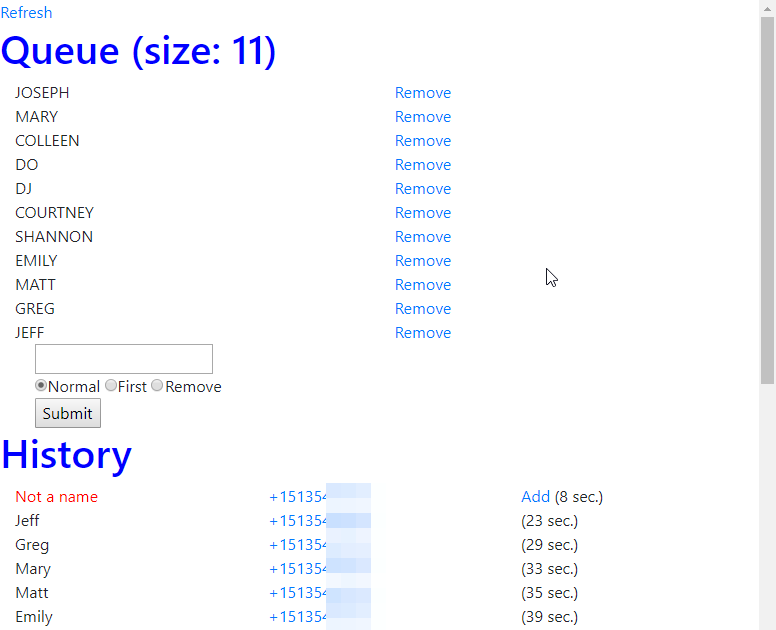
The web server also contains an admin page that allows us to remotely monitor the queue. We can remove or add new names to the queue (without going through the name validation). Most of the time, we use this to “add” any valid names that were incorrectly blocked by the name filter. Because of this, we have a one-click “add” button displayed against anything that doesn’t pass the filter.
Source Code
Videos


Photos